Custom regex scopes
You can define custom scopes using regexes in user/cursorless-settings/experimental/regex_scope_types.csv
tip
Use "visualize <scope>" to see a live preview of the regex scope in the scope visualizer. It updates in real time every time you save regex_scope_types.csv.
For example, here's what "visualize dotted" would show with the scope type dotted,"[\w.]+":
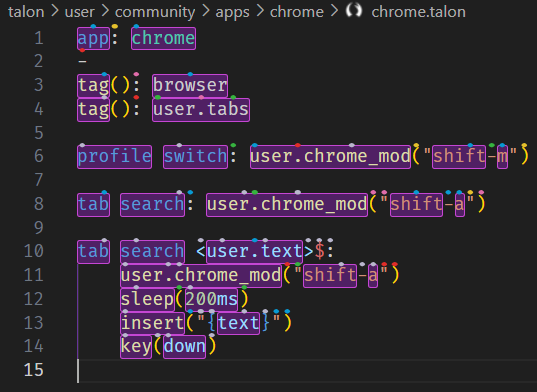
You can then use commands such as
"take dotted sun"to selectuser.text(line 10)"copy dotted urge"to copyuser.chrome_mod(line 11)"take every dotted urge"to selectuser.chrome_mod,shift, anda
Examples
| Spoken form | Regex | Notes | Example |
|---|---|---|---|
| dotted | "[\w.]+" | Matches dotted expression | one.two.three |
| pair math | "\$[^$]*\$" | Matches latex inlined math expression. May fail to match if line has unmatched expressions. | $e^{\pi i}=-1$ |
| inside math | "[^$]*" | Matches interior of a latex inlined math expression | e^{\pi i}=-1 |
| chain pipe | (?:%>%|%<>%|%T>%||>) | Matches R pipe operators | %>%, %<>%, %T>%, |> |
| inside chain | (?<=(?:%>%|%<>%|%T>%||>)\s*)\S.*?\S(?=\s*(?:%>%|%<>%|%T>%||>)) | Matches content between pipe operators in R chains | filter(x > 0) |
| head chain | (?<=(?:%>%|%<>%|%T>%||>)\s*)\S[^|%\n]* | Matches content from current position until next pipe operator | mutate(y = x * 2) %>% |
| tail chain | \S.*?\S?(?=\s*(?:%>%|%<>%|%T>%||>)) | Matches content from pipe until current position | %>% filter(x > 0) |
warning
Regex matches cannot cross line boundaries (so multiline matches are not supported). The regexes also have the unicode flag set.